Your account and subscription
Your plan and invoices, password, language, dark mode — and what happens when a payment does not go through.
Everything about your own account lives under My account in the top right corner: your subscription, your password and the language of the workspace.
Your subscription
My account › My subscription shows the plan of each figure, how much of it you have used this month, when it was paid until, and every payment with its invoice to download.
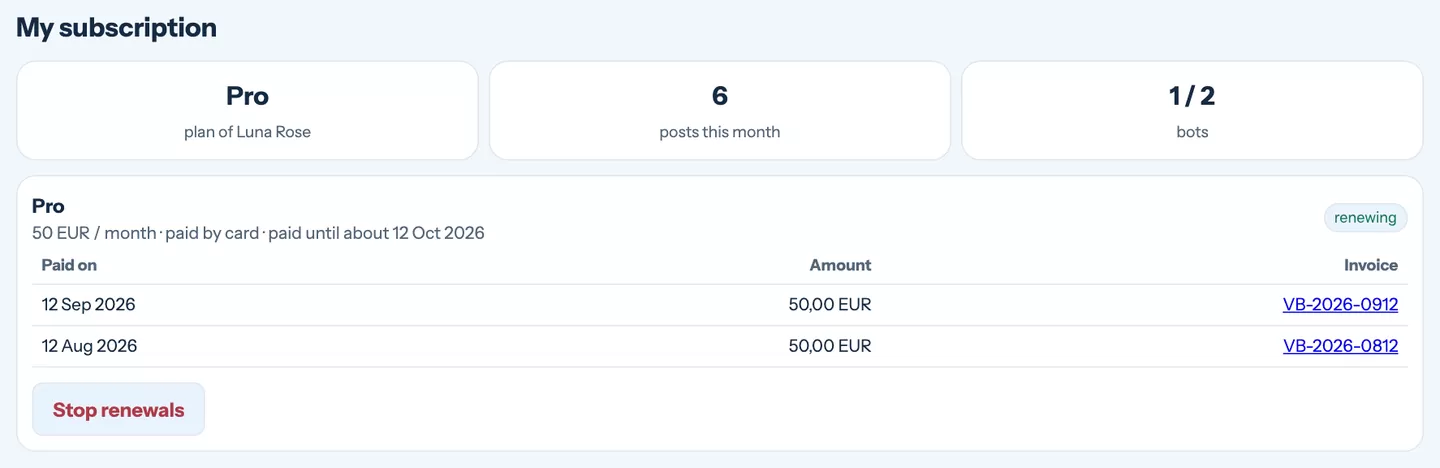
- Limits — plans differ in how many bots a figure may have and how many posts you can create per month. Drafts and scheduled posts count; a post that went out does not count twice.
- Invoices — every payment has its invoice next to it. Company details are taken from your order.
- Stop renewals — ends the subscription at the end of the paid period. Until then everything keeps working.
When a payment does not go through
If a renewal fails or you stop renewing, a yellow bar appears at the top of every page: Publishing is paused. Your content, fans and settings stay exactly as they are — only new posts and uploads wait. Pay the subscription and publishing starts again by itself, no need to contact anyone.
Your members are not affected by this: the bot keeps welcoming people, taking payments and letting paying members into your channel.
Password
The password from your welcome e-mail was generated for you. Change it to one only you know under My account › Password. After several wrong attempts in a row the account locks for a few minutes — that protects you from someone guessing.
Language and dark mode
- Language — My account › Language switches the whole workspace. It does not change what your bot writes to fans: the bot answers each person in their own language, and in the channel it uses the channel language of your figure.
- Dark mode — the moon button in the top bar. Your choice is remembered in the browser.
More than one figure
If you run several projects, each one is its own figure with its own bot, channels, gallery and fans. When you have access to more than one, a switcher appears at the left of the top bar — everything you see then belongs to the figure you picked. Need another figure? Write to us and we will add it to your account.
Still stuck?
Write to us and a person will answer — usually within a working day. Tell us which figure and which page it is about.